Why Print Lotería Boards?
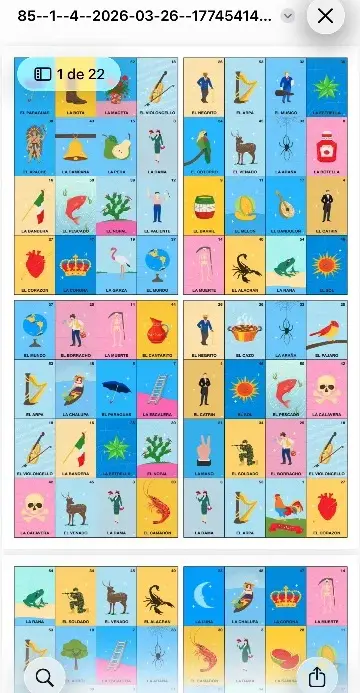
To print Lotería boards for a large group, you don’t need to buy a physical set. The Mexican Lotería deck app generates unique, randomized boards in PDF format, ready to print on any printer. Each board has 16 different images, just like traditional ones.
Perfect for posadas, birthday parties, school events, or any gathering where you need many different boards quickly.
Steps to Create Your PDF Boards
Step 1: Open the Decks section
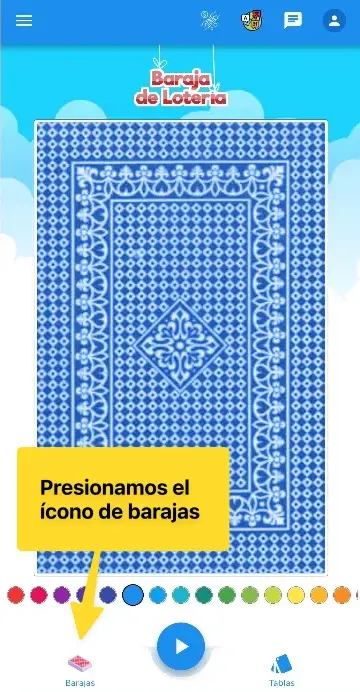
On the app’s main screen, tap the “Barajas” (Decks) icon in the bottom navigation bar.
Step 2: Select “Baraja de Lotería”
From the list of available decks, select “Baraja de Lotería” (the classic 54-card deck).

Step 3: Tap “Imprimir tablas de lotería”
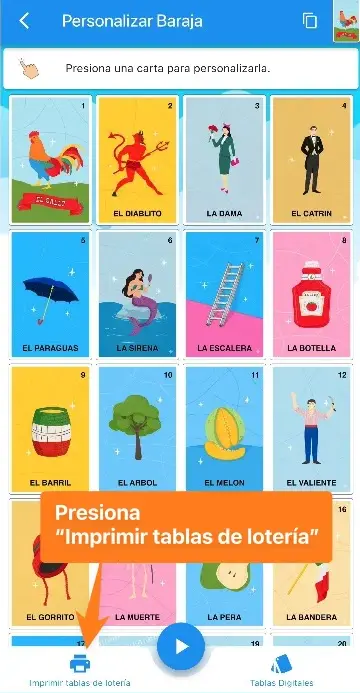
Inside the deck, at the bottom of the screen, tap the “Imprimir tablas de lotería” (Print Lotería boards) button.
Step 4: Create a new PDF
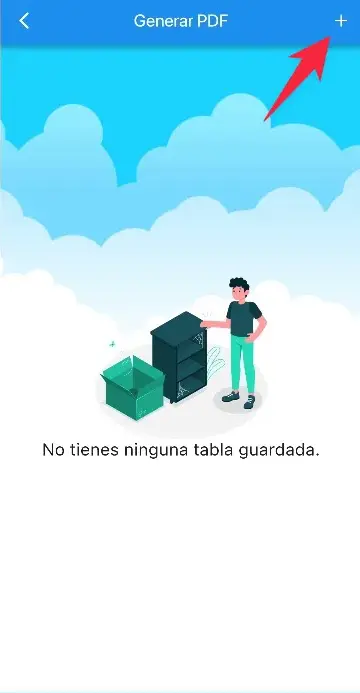
If this is your first time, you’ll see an empty screen with the message “No tienes ninguna tabla guardada” (No boards saved yet). Tap the ”+” button in the top-right corner to create a new PDF.
Step 5: Configure your PDF
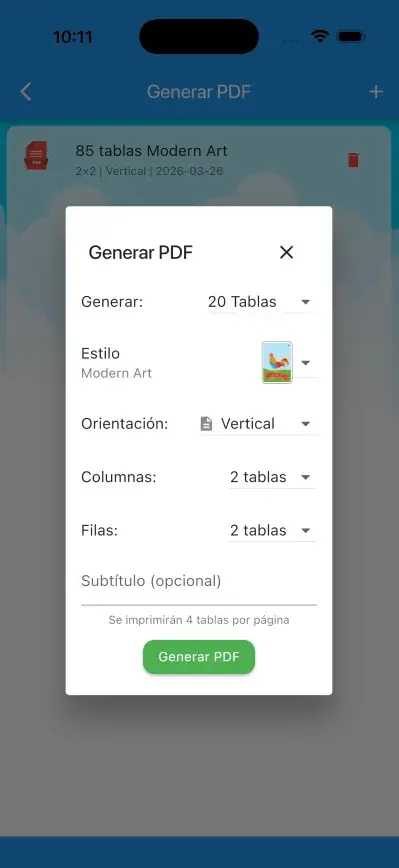
A settings panel appears with these options:
- Number of boards — choose how many boards the PDF will include (e.g., 20 boards for 20 players)
- Style — the visual design of the boards (Modern Art, classic, etc.)
- Orientation — portrait or landscape depending on your paper size
- Columns and rows — how many boards print per page (e.g., 2×2 = 4 boards per page)
- Subtitle (optional) — a label to identify this PDF in your list
The app shows a summary: “Se imprimirán X tablas por página” (X boards per page) so you know exactly how it will look before generating.
Step 6: Generate and share the PDF
Tap “Generar PDF” (Generate PDF). In seconds you’ll have a PDF with all the boards, ready to share or send to a printer.
Printing Tips
- For groups of 10–20 players, use 2 columns × 2 rows in portrait orientation on letter-size paper
- For A4 or legal-size paper, landscape orientation with 2×2 also works great
- The subtitle is useful when you generate multiple PDFs (for example, one per themed deck)
- Save the PDF to iCloud, Google Drive, or share via WhatsApp to send it directly to a printer or another person
Boards for Other Decks
The same process works with any deck in the app: Animals, Baby Shower, Body Parts, or any custom deck you’ve created. Each PDF will generate boards with that deck’s images.
Don’t have the app yet? Download it for free and organize your next game in minutes.
Download for free
Available for iOS and Android